
Why Background Removers Upload Your Photos

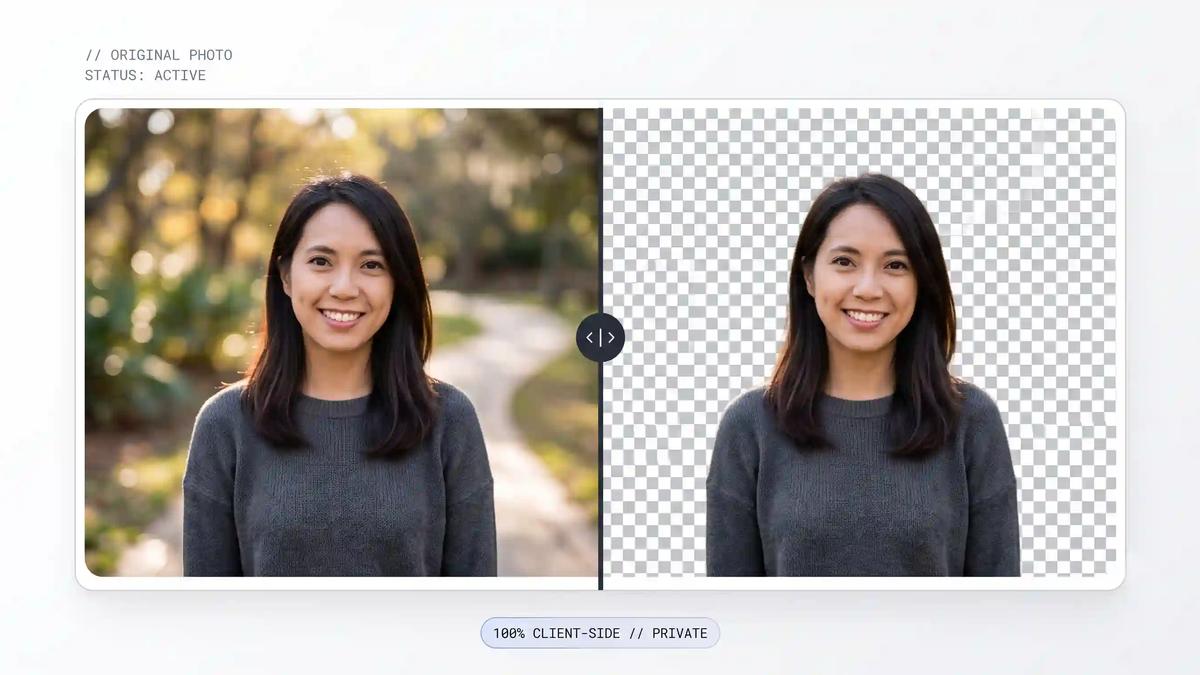
If you've ever used one of the popular "free" background remover websites, you've probably never thought twice about what actually happens between clicking upload and seeing your result. Your photo goes somewhere, something processes it, and a few seconds later you get a transparent PNG back. Convenient — but that middle step is worth understanding, especially if you're working with photos you'd rather not hand off to someone else's server.
What Actually Happens When You Upload a Photo to a "Free" Background Remover
Almost every background remover you've used works the same way under the hood: your image file leaves your device, travels to a company's server, gets processed by an AI segmentation model running on their infrastructure, and the result gets sent back to your browser. That's not a flaw exactly — it's just the default architecture for how these tools have historically been built, since running a real AI model used to require a dedicated server-side GPU that no consumer laptop or phone could match.
The catch is that somewhere in that round trip, a copy of your photo exists on a server you don't control, even if only briefly. Most of these tools are legitimate and say the right things in their privacy policies, but the honest truth is that "the photo is deleted after processing" is a claim you're trusting, not something you can verify from the interface itself. For a casual meme edit, that's a non-issue. For a client's unreleased product photo, a document with someone's face in it, or anything under an NDA, it's worth pausing on.
Where This Actually Matters
This isn't really about any one tool being untrustworthy — it's about the category of problem. A few situations where it's genuinely worth caring:
- Freelancers and agencies editing client photos or product shots before a launch, where the client would not be thrilled to learn the images passed through a third-party server first
- E-commerce sellers processing product photography that's meant to be exclusive until a listing goes live
- Anyone editing photos with identifiable people in them — family photos, ID-style photos, professional headshots — where "which server did this touch" is a fair question to ask
- Businesses in regulated spaces (legal, healthcare, finance) where sending any image containing personal data to an unknown third party can be a genuine compliance problem, not just a preference
Even outside those cases, there's a simpler argument: if a tool can do the job without ever uploading your photo anywhere, that's just strictly better than one that can't — with no real downside.
What I Built: A Background Remover That Never Leaves Your Browser
I built a Background Remover that skips the upload step entirely. Your photo never leaves your device — not to my servers, not to anyone else's. Everything happens locally, inside your browser.
How It Works
The short version: instead of sending your image to a server running an AI model, your browser downloads the AI model itself, once, and runs it locally.
- The model loads once, in your browser. The tool uses onnx-community/ormbg-ONNX, an open-source segmentation model built on the IS-Net architecture with roughly 44 million parameters. Released under the Apache-2.0 license, it's genuinely free to use in a commercial product — unlike some alternatives that look free but come with non-commercial or copyleft licensing terms once you read the fine print. The model ships in a few precision levels: full 32-bit precision runs about 176MB, a 16-bit version around 88MB, and an 8-bit quantized version around 44MB. The tool picks the fastest one your device and browser can actually run well.
- Everything runs on WebAssembly, and GPU-accelerated where possible. Modern browsers can execute near-native-speed code through WebAssembly (WASM), and where available, tap into your device's GPU directly through WebGPU for a meaningfully faster result. The tool tries GPU acceleration first and falls back to a CPU-based WASM path automatically if your browser doesn't support it.
- Processing happens in a background thread. The actual image processing runs in a Web Worker, a separate thread from the page itself, so your browser stays responsive instead of freezing while it works.
- Large images get resized safely first. Browser-based WASM runs inside a capped linear memory space, and a large photo run through a deep segmentation model can exhaust that limit and crash. Images with a longest edge over 1536 pixels are automatically downscaled before processing, which keeps things stable on a typical mobile phone photo without any visible quality loss in the final cutout.
- The result never touches a server. The output — a transparent PNG — is generated and handed straight back to you, entirely on your device, start to finish.
Does It Actually Work As Well?
Client-side doesn't mean lower quality here — it's the same category of AI segmentation model, just running somewhere different. In testing, it handles the genuinely hard cases well: fine hair and flyaway strands, busy or high-contrast backgrounds, and typical product and portrait photos all come out clean. The one real tradeoff is the first-run download — the model needs to load once per browser, which takes a few seconds depending on your connection and device. After that first load, your browser caches it, and every image after is fast.
Who This Is For
- E-commerce sellers creating clean product photos for Etsy, Amazon, or Shopify listings
- Job seekers cleaning up a resume photo or LinkedIn headshot
- Freelancers and agencies who'd rather not route client images through a third-party server
- Students and creators making thumbnails, presentation graphics, or social content
- Basically, anyone who wants a background removed without wondering where the photo went afterward
Try It
The Background Remover is live now on ToolFesto — free, unlimited, no sign-up, and nothing ever leaves your browser. It even works offline after the first use, since the model is cached locally.
Run into an image it struggles with, or want a feature added? I'd genuinely like to hear about it — this is an actively maintained tool, and real-world photos are exactly what make it better over time.
Share this article
Enjoyed the read? Share it with your network.