
Why pasting raw CSVs into LLMs is costing you a fortune

The $300 spreadsheet mistake in modern AI workflows
Pasting a raw CSV or Excel file directly into an LLM is one of the fastest ways to drain an API budget. Consider a standard workflow: a data analyst or developer exports last month's customer churn log or sales ledger, drops the 3,000-row CSV into Claude or ChatGPT, and asks four follow-up questions. Within ten minutes, that single session has consumed over 200,000 input tokens. Worse, when asked to sum Q3 revenue across specific product tiers, the model returns a confident, completely fabricated number.
Tokens are the metered compute unit of artificial intelligence. Paying an LLM API to process thousands of repetitive commas, quotation marks, empty cells, and unrounded floating-point decimals is the financial equivalent of paying cloud server rates to store blank text files.
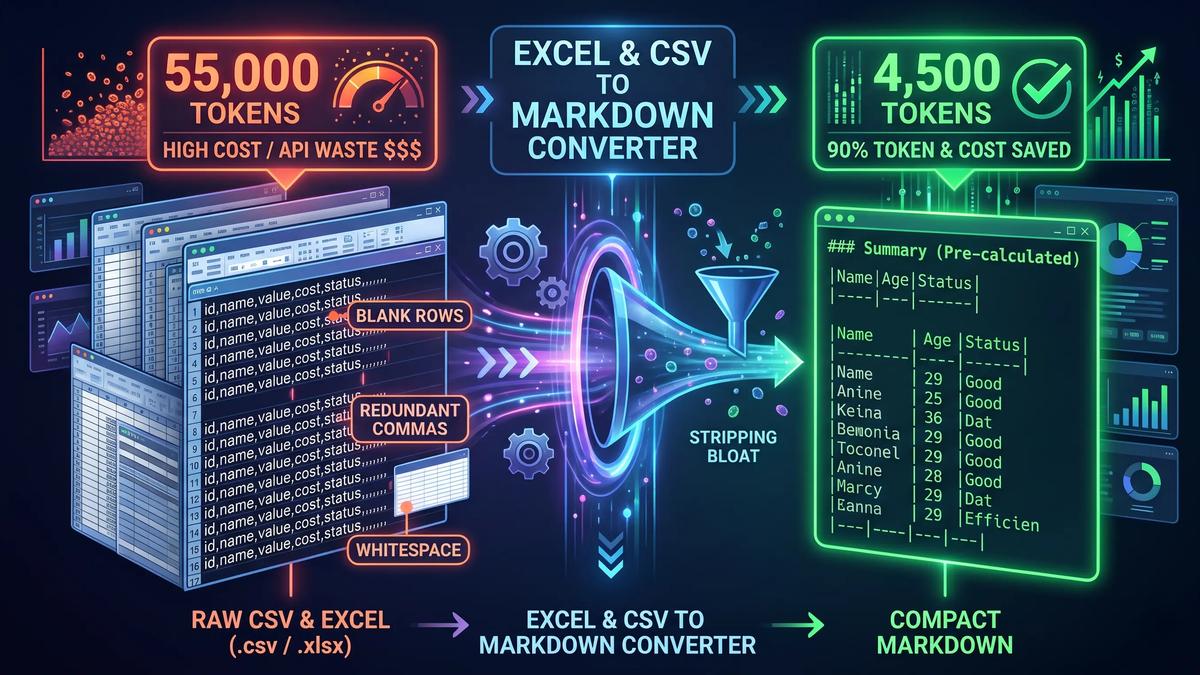
Converting spreadsheets through the ToolFesto Excel & CSV to Markdown Converter eliminates this waste before the prompt ever reaches the model. By stripping structural bloat and pre-calculating column math locally in your browser, you can shrink a 55,000-token spreadsheet into a 4,500-token executive digest.
Why raw CSV and Excel files drain LLM token budgets
Large language models do not view spreadsheets as visual two-dimensional grids. They read inputs as a linear sequence of token IDs generated by Byte-Pair Encoding (BPE) tokenizers such as OpenAI's o200k_base or Anthropic's tokenizer. Raw tabular exports inflate this token stream through three specific mechanisms:
- Delimiter and quote fragmentation: In standard CSV files, values containing commas, currency symbols, or spaces are wrapped in double quotes (
"$1,420.50","Enterprise Plan",0.02849102). BPE tokenizers frequently split quote-comma-quote sequences, long decimal tails, and empty delimiters (,,,,) into separate tokens. A 2,000-row CSV with 12 columns routinely consumes 30,000 to 60,000 tokens before you write a single instruction. - Padded whitespace overhead: Many standard Markdown table generators format tables for human readability by padding cells with spaces (
| Product | Revenue |). While visually aligned in a code editor, long runs of spaces and hyphen separator rows (|---------------|------------|) generate hundreds of zero-information tokens across large tables. - Context dilution in the middle of the window: Transformer attention mechanisms degrade when a context window is packed with repetitive structural noise. When 80% of your prompt consists of empty cells, zero-value rows, and unformatted delimiters, the model loses track of column positions—a phenomenon researchers call the "lost in the middle" effect. In wide tables, an LLM reading row 1,800 often misattributes values from column G to column H.
How Compact Pipe Markdown reduces token usage by up to 90%
Markdown is the structural format most heavily represented in LLM pre-training datasets, which pull extensively from GitHub repositories, technical documentation, and Stack Overflow. Because models have seen millions of Markdown tables during training, pipe characters (|) provide clear boundary markers for attention heads to map cell values back to their column headers.
However, standard GitHub Flavored Markdown (GFM) is built for human eyes, whereas Compact Pipe Markdown is built for tokenizers.
Standard padded Markdown (32 tokens):
| Campaign Name     | Impressions | Clicks | Avg CTR  |
|-------------------|-------------|--------|----------|
| Brand_Search_US   | 14200       | 1136   | 8.00%    |
Compact Pipe Markdown (19 tokens):
|Campaign Name|Impressions|Clicks|Avg CTR|
|---|---|---|---|
|Brand_Search_US|14200|1136|8%|
By removing cell padding, collapsing the header separator to minimal |---|---| markers, rounding noisy floating-point decimals to two places, and stripping blank rows, Compact Pipe formatting preserves 100% of the semantic table structure while cutting syntax overhead to the bare minimum.
The compound token multiplier in multi-turn coding agents and RAG
Token efficiency matters far more in multi-turn workflows than in single chat prompts. When you use autonomous coding agents like Cursor, Claude Code, or Windsurf, or when you run iterative Retrieval-Augmented Generation (RAG) pipelines, the conversation history is re-sent to the API on every single step.
If an agent inspects a raw spreadsheet payload of 40,000 tokens and takes 15 tool-calling turns to filter anomalies, write Python validation scripts, and summarize findings, the token math compounds linearly per turn:
$$\text{Raw CSV Payload: } 40,000 \text{ tokens} \times 15 \text{ turns} = 600,000 \text{ input tokens}$$
When you compress and pre-filter that same dataset down to a 4,000-token Compact Pipe Markdown digest before feeding it into the agent loop:
$$\text{Compact Markdown Digest: } 4,000 \text{ tokens} \times 15 \text{ turns} = 60,000 \text{ input tokens}$$
That single pre-processing step delivers a 90% reduction in API compute cost and cuts Time-To-First-Token (TTFT) latency by up to 80%, because the model does not have to run quadratic self-attention calculations across 36,000 tokens of redundant commas and zero-value rows on every turn.
API cost comparison across 50 multi-turn analysis runs
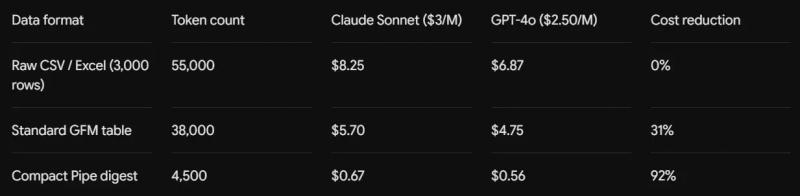
For an SEO agency, financial analyst, or engineering team executing 100 multi-turn data queries a day, switching from raw CSV pastes to Compact Pipe Markdown digests lowers monthly API expenditure from roughly $500 to $45.
Stopping LLM math hallucinations with deterministic ground truth
Reducing token count only solves half the spreadsheet problem. The second failure mode is arithmetic hallucination.
Large language models predict the next token using probability distributions; they do not execute deterministic ALU arithmetic when reading a table. When you ask an LLM, "What is our total Q3 revenue and average conversion rate from this table?", the model attempts to approximate sums across hundreds of rows in a single forward pass. It routinely drops rows, misaligns decimal points, and fabricates totals.
The reliable fix is deterministic pre-computation. Before formatting your spreadsheet into Markdown, the ToolFesto Excel & CSV to Markdown Converter runs a local JavaScript statistical pass across every column to calculate exact mathematical values. It then injects an executive ground-truth block directly above the Markdown table:
Executive Summary (Pre-Calculated Ground Truth)
- Total Rows: 1,420 (Excluded 890 empty/zero-click rows)
- Revenue: Sum = $482,910.50 | Mean = $340.08 | Min = $12.00 | Max = $14,200.00
- CTR: Mean = 2.84% | Min = 0.12% | Max = 18.40%
- Top Category Frequency: Enterprise (612), Mid-Market (508), SMB (300)
- Total Rows: 1,420 (Excluded 890 empty/zero-click rows)
- Revenue: Sum = $482,910.50 | Mean = $340.08 | Min = $12.00 | Max = $14,200.00
- CTR: Mean = 2.84% | Min = 0.12% | Max = 18.40%
- Top Category Frequency: Enterprise (612), Mid-Market (508), SMB (300)
When this summary block sits at the top of the prompt, the LLM never has to guess or compute column addition. It anchors its reasoning to verified numbers calculated by deterministic code, then uses the Markdown rows below to explain qualitative patterns, identify outliers, and recommend actions.
Turning Google Search Console ZIP exports into actionable SEO prompts
Google Search Console (GSC) and Bing Webmaster Tools exports illustrate why raw CSVs fail in AI workflows. When you export a GSC performance report, it arrives as a .zip archive containing multiple CSVs (Queries.csv, Pages.csv, Countries.csv, Devices.csv), often holding 10,000 to 50,000 rows.
In a typical GSC query export, up to 85% of the rows are single-impression, zero-click long-tail variations. Pasting a 25,000-row GSC CSV into an LLM overflows the context window or wastes tens of thousands of tokens on queries that have no statistical significance.
Instead of manually unzipping files, cleaning rows in Excel, and building pivot tables, you can drop the raw GSC .zip archive directly into the converter. The tool decompresses the archive in memory, computes full-dataset macro totals first so your overall click and impression counts remain 100% accurate, prunes zero-click noise below your minimum impression threshold, and organizes the remaining data into five strategic SEO buckets:
- Top Performers: Queries ranked by highest click volume to protect core traffic drivers.
- Striking Distance (Positions 4.0 to 15.0): High-impression queries sitting on the bottom of page one or top of page two that can reach the top three results with targeted on-page updates or internal links.
- CTR Anomalies (Positions 1.0 to 5.0 with CTR under 3%): Queries where you already rank at the top of the SERP but lose clicks due to weak title tags, outdated years in headlines, or SERP features pushing organic results down.
- SERP Cannibalization & Zero-Click High Visibility (Positions 1.0 to 20.0 with 0 clicks): High-impression queries failing to convert into visits.
- Deep-SERP Content Seeds (Positions above 20.0): Emerging topics where your site has initial topical authority and needs dedicated new articles.
This automated stratification compresses a noisy 25,000-row .zip export into a structured 1,500-token Markdown brief that Claude, ChatGPT, or Gemini can turn into a prioritized content audit in seconds.
Client-side Web Worker architecture for enterprise data privacy
Uploading proprietary financial models, customer cohort exports, payroll sheets, or private Search Console performance data to third-party online converters introduces a serious security risk. Most web-based file converters upload your spreadsheet to a remote backend server, parse it in a cloud container, and store temporary copies in server logs.
The ToolFesto Excel & CSV to Markdown Converter is engineered with a zero-upload, 100% client-side architecture:
- In-browser Web Workers: Multi-sheet
.xlsxparsing,.zipdecompression, statistical aggregation, and Markdown compilation execute inside dedicated browser Web Workers off the main UI thread. Even 50MB spreadsheets parse smoothly without freezing your browser tab. - Local WebAssembly BPE tokenization: Real-time token counting and savings calculations run locally in your device's memory using WebAssembly.
- Zero network transmission: No spreadsheet rows, cells, filenames, or metrics ever leave your machine. Once the page loads, you can disconnect from the internet entirely and convert confidential
.xlsxand.csvfiles offline.
How to convert Excel, CSV, or GSC exports into AI-ready Markdown
You can prepare any spreadsheet for an LLM or technical documentation page in four steps:
- Load your file: Open the Excel & CSV to Markdown Converter and drag and drop an
.xlsx,.xls,.csv,.tsv, or Google Search Console.zipfile into the dropzone (or click "Load Sample GSC Data" to test the workflow immediately). - Select your output syntax: Choose Compact Pipe Format to strip padded whitespace for LLM prompts and RAG ingestion, or choose Standard Markdown Table for visually aligned GitHub READMEs and documentation.
- Configure data hygiene and bucketing: Toggle Strip Empty Rows, Round Decimals (rounds floats to 2 decimal places), and Column Statistics to prepend deterministic sums, means, minimums, and maximums. If you loaded a GSC export, enable Prune Zero-Click Long-Tail Noise and select your target SEO buckets.
- Export to your workflow: Click Copy for AI to copy the compiled Markdown digest (complete with optional AI system prompt instructions) directly to your clipboard, or click Download (.md) to save the file locally for your repository or vector database.
Frequently asked questions
Does converting CSV to Markdown actually reduce LLM tokens?
A raw CSV with short numeric values can sometimes use roughly the same character count as a heavily padded Markdown table. However, converting a spreadsheet to Compact Pipe Markdown while stripping empty rows, rounding excessive floating-point decimals, and filtering zero-value long-tail records cuts total token consumption by 70% to 90%. Furthermore, Markdown pipes (|) give transformer attention heads explicit column boundaries, improving retrieval accuracy on wide tables compared to comma-separated strings.
Why do LLMs fail at adding numbers in CSV and Excel files?
LLMs do not run spreadsheet formulas when reading prompt text; they predict the most likely next token based on language patterns. Across hundreds of rows, probabilistic token prediction loses track of carry operations and decimal places. Pre-calculating exact column sums, averages, and min/max values in JavaScript and placing them in the Markdown header gives the LLM verified ground truth so it never has to guess arithmetic.
How are multi-sheet Excel workbooks handled during conversion?
When you drop a multi-sheet .xlsx or .xls workbook into the converter, the tool parses each worksheet independently in your browser. It generates a unified Markdown document with clear section headers (## Sheet: [Name]), per-sheet statistical summaries, and individual Compact Pipe tables, allowing you to toggle specific sheets on or off before copying.
Is it safe to convert confidential financial spreadsheets in the browser?
Yes, provided the tool runs strictly client-side. The ToolFesto Excel & CSV to Markdown Converter processes all files locally inside browser Web Workers with zero server uploads, zero external API calls, and no database storage. You can verify this by opening your browser's Network inspector tab—no file payload is ever transmitted over the network.
Share this article
Enjoyed the read? Share it with your network.